Workflow Controls

Hiring workflow controls your admin can explain in one screen.

Recruit brings your hiring rules into one page: stage rules, reply-time targets, approval steps, automation settings, candidate messages, and audit notes. This version shows fixed sample data, so leaders can review how the controls work before going live.

No live data. Fixed sample states only — no tenant or customer information.
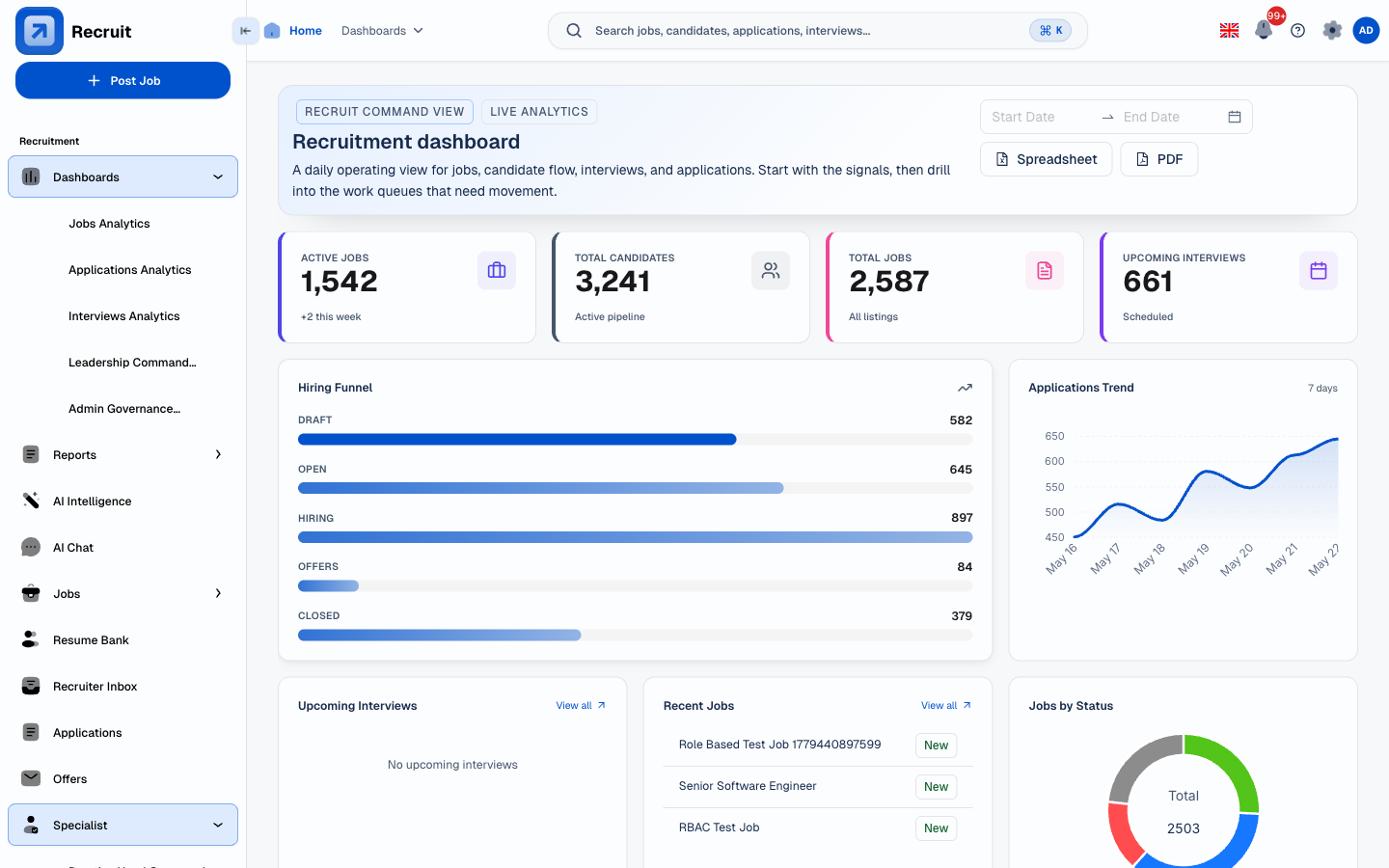
Recruit workflow screen showing a connected hiring flow across applications, interviews, offers, and reporting Product screenshot Captured Jun 16, 2026 Source: React SPA seeded workflow capture

Stage controls

Define visible hiring stages, allowed transitions, required exit criteria, and who can move a candidate forward or back.

SLA rules

Set review windows for screening, interview feedback, approvals, and offer turnaround before delays become hidden.

Approval gates

Route sensitive changes such as offer terms, bypasses, senior-role moves, and final decisions through the right approvers.

Automation toggles

Switch reminders, assessment sends, feedback nudges, and candidate status messages on or off by stage.

Candidate checkpoints

Make candidate communication checkpoints explicit so teams know when templates, reminders, and status updates fire.

Governance hints

Surface audit notes, override requirements, owner roles, and evidence coverage beside each control.

Product view: control overview

All your hiring settings in one place, without showing the technical settings underneath.

Hiring leaders need to know whether their process is set up correctly before the first requisition goes live. This read-only control list shows what Recruit already has: what is configurable, what is currently on, and where the audit trail exists.

Replaces vague workflow claims with a concrete control list leaders can inspect.

  • Stage ownership — each hiring step has owners, allowed transitions, and entry or exit criteria.
  • Delay prevention — SLA timers and escalation owners are visible before a candidate stalls.
  • Sign-off required for sensitive actions — sensitive actions require sign-off and a recorded reason.
  • Candidate communication — status updates and template checkpoints are tied to real workflow moments.
Default hiring workflow Team preview

Feedback SLA reminders

Notify interviewer and recruiter when feedback is pending after 24 hours.

Senior offer approval gate

Require TA Head and Practice Head sign-off before release.

Auto-send rejection message

Hold for recruiter review when candidate reached interview stage.

Override reason required

Capture reason, owner, timestamp, and affected stage for every bypass.

Configurable control groups

What leaders can review before teams start using it.

Each control group has a clear state, owner expectation, and governance note. This version shows fixed sample data. A later version will connect to real saved settings in the admin screen.

Configured

Stage controls

Keep hiring stages understandable while preserving strict movement rules.

  • Intake, Sourcing, Screening, Interview, Offer, Hired, and Archived stages.
  • Allowed next-state map with backward moves recorded as corrections.
  • Exit criteria for screening notes, interview schedule, feedback, and offer readiness.
Alerting

SLA rules

Make time pressure visible before it turns into a lost candidate.

  • New applicant review due within one business day.
  • Interview feedback due within 24 hours after the scheduled slot.
  • Offer approval due within two business days, with TA Head escalation.
Approval required

Approval gates

Protect sensitive decisions without slowing every ordinary move.

  • Senior offers require Practice Head and TA Head approval.
  • Salary-band changes require reason capture before approval.
  • Bypass actions require owner, reason, and stage context.
Mixed

Automation toggles

Turn automation on where it saves effort, hold it where humans need to review.

  • Feedback reminders and interview nudge automation enabled.
  • Assessment send automation staged behind recruiter confirmation.
  • Rejected-after-interview messages held for manual review.
Checkpointed

Candidate communication checkpoints

Show when the candidate hears from the team and which message path is used.

  • Application received, interview scheduled, feedback pending, offer next steps.
  • Template owner and last-reviewed timestamp visible beside each checkpoint.
  • High-sensitivity messages require recruiter preview before send.
Governed

Audit and governance hints

Expose what will be traceable when leaders ask why a decision changed.

  • Rule change owner, timestamp, previous value, and new value.
  • Override history linked to the candidate or requisition timeline.
  • Controls respect each person's role and what data they are allowed to see.
Permission matrix and impact preview

Admins see who is affected before a control is saved.

Each control shows a role matrix alongside a preview of what changes before you save. Leaders can tell which roles configure policy, which teams approve exceptions, who executes the day-to-day workflow, and what the audit trail will look like after the change.

Workflow impact preview

Changing a toggle or reminder threshold shows you a preview of what changes before you save the setting.

TA second-job approval: enabled Duplicate active application attempts route to an approval queue with candidate, job, requester, approver, and reason evidence.
Feedback edit workflow: enabled Submitted scorecard edits become explicit approval requests instead of silent history changes.
Reminder windows changed Interview and feedback reminder volume shifts immediately after save, so TA leadership can predict noise before rollout.

Permission matrix

Role
Configure
Approve
Execute
Evidence expectation
Superadmin
Yes
Yes
Yes
Actor and timestamp on setting changes.
TA Head
No
Escalates
Yes
Assignment, SLA, and queue movement on application timeline.
Practice Head
No
Yes
By role
Job and job-request approvals stay tied to practice scope.
Recruiter / TA
No
Requests
Yes
Bypass and candidate movement create explicit workflow evidence.
Interview panel
No
No
Assigned only
Submitted feedback changes require an approval trail.
Workflow coverage

Controls stay attached to the stage where the work happens.

The list reads like a leader checklist. Each stage shows what rules apply, SLA coverage, approval requirements, automation behaviour, candidate messages, and what gets tracked.

Stage
Rules
SLA
Approval
Automation
Audit
Intake
Required owner
1 day to accept
Practice Head for priority change
Job setup checklist
Change log
Screening
Exit notes
2 days to shortlist
Override reason
Reminder on
Decision owner
Interview
Round kit
24h feedback
Panel dispute review
Feedback nudge on
Scorecard history
Offer
Terms check
2 days to release
TA Head and Practice Head
Candidate next step draft
Approval trail
Closure
Final state
Same week closeout
Exception only
Archive reminders
Outcome report
Implementation and trust

Clear controls now, connected to real saved settings later.

Workflow Controls v1 is deliberately simple: it is public, static, and contains no live data. It gives teams a clear picture of what the controls look like today, and leaves a straightforward path to connect each row to existing settings, feature flags, notification preferences, and approval workflow services in a later version.

No live data

No tenant data

The page shows control categories and sample states only. It does not query live jobs, candidates, users, or any private workflow configuration.

Config-ready

Maps to existing strengths

Stage policy, approvals, feature flags, notification preferences, and audit logs already exist in the product. This page organises them in one readable list.

Leader-readable

Explains the controls

Each rule is written in language a TA leader or IT partner can read and verify, not internal technical terms.

Governance

Overrides leave evidence

Bypass and approval language is explicit: owner, reason, timestamp, and affected workflow stage should be visible when a decision is reviewed.

Give hiring teams a workflow they can configure and explain.

Bring stage policy, SLAs, approvals, automations, candidate checkpoints, and what gets tracked into one page leaders can read without needing to open the technical settings underneath.